# Statistics Functionality
The IOIO Live Workflows's Statistics allows for more thorough view of the Live Service and its usage. The statistics allow to create a detailed view of the customer's workloads based on a variety of filters and periods.
How it works:
- There is a dedicated endpoint for workflow statistics in the Live Service Swagger.
Endpoint:
GET /channels/statistics
- The endpoint accepts the following query parameters:
- startDate: Date from which the statistic will start. Required field.
- Note that if Granularity is set at week, the first day of the week in which startDate falls will be taken into consideration. For example 2021-12-15 is set as startDate but the period will be from 2021-12-13 as this is the first day(Monday) of the week. Same thing applies for granularity MONTHLY but then for start will be set the begining of the month.
- startHour: Integer field which accepts values from 0 to 23. Note that result >= startHour. Required only for Hourly granularity.
- endDate: Date up to which the statistics is returned. Maximum period is 1 year for Daily, Weekly and Monthly granularity and 14 days for Hourly granularity. Required field.
- endHour: Integer field which accepts values from 0 to 23. Used for closing the hour range. Note that result < endHour. For example if endHour is set at 22 the results will be up to 21:59:59. Required for Hourly granularity.
- region: If the Live Service is installed in more than one regions the results can be filtered by region. Also if left blank and there is more than one region available, all regions are included. Optional field.
- statistics An array which accepts the workflow statuses: RUNNING, CREATED, DELETED, START_FAILED, STOP_FAILED, DONE. Required field.
- granularity Accepts a string with values: HOURLY, DAILY, WEEKLY, MONTHLY. Required field.
- groupBy String field with possible value REGION. Groups the results by region if more than one region is supported. Optional field.
- startDate: Date from which the statistic will start. Required field.
Now let's make a sample request, the below screenshot shows a basic request which takes start and end dates with the startDate having a startHour set at 0 and the endDate's endHour is set at 23.
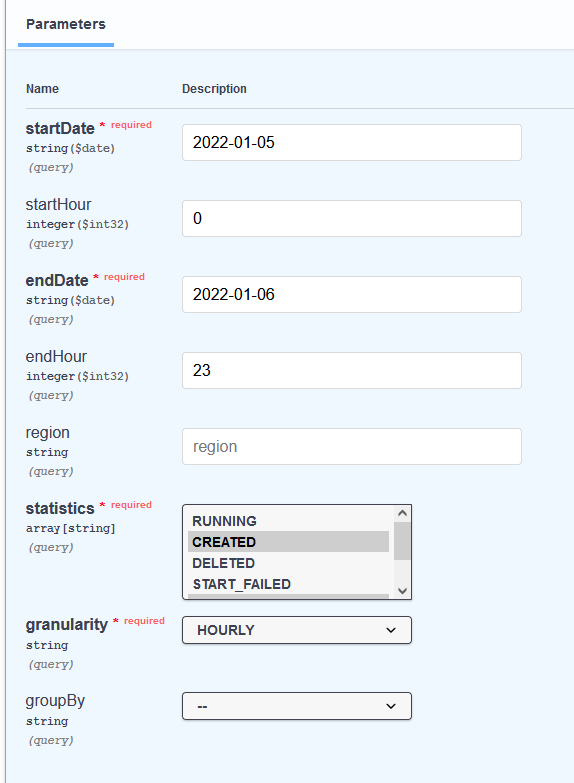
- The response from the endpoint looks like this:
{
    "items": [
        {
            "statistic": "CREATED",
            "items": [
                {
                    "timePeriod": {
                        "start": "2022-01-05T15:00:00.000Z",
                        "end": "2022-01-05T16:00:00Z"
                    },
                    "totals": {
                        "itemsCount": 1
                    }
                },
                {
                    "timePeriod": {
                        "start": "2022-01-05T16:00:00.000Z",
                        "end": "2022-01-05T17:00:00Z"
                    },
                    "totals": {
                        "itemsCount": 0
                    }
                },
                {
                    "timePeriod": {
                        "start": "2022-01-05T17:00:00.000Z",
                        "end": "2022-01-05T18:00:00Z"
                    },
                    "totals": {
                        "itemsCount": 0
                    }
                }
            ]
        },
        {
            "statistic": "STOP_FAILED",
            "items": [
                {
                    "timePeriod": {
                        "start": "2022-01-06T09:00:00.000Z",
                        "end": "2022-01-06T10:00:00Z"
                    },
                    "totals": {
                        "itemsCount": 2
                    }
                }
            ]
        }
    ]
}
As we can see here we have an array named items which stores the meaningful data. The above example features statistics for CREATED and STOP_FAILED. If we take a closer look at the CREATED results we see that the first timePeriod is between 2022-01-05T15:00:00.000Z and 2022-01-05T16:00:00.000Z.
This is due to the fact that if there are no results for the hours from 0 to the first result. Once a result has been found until the end of the period there will be results even if there are no actual results the itemsCount will be just set to 0.
Another example can be observed below:
{
  "items": [
    {
      "statistic": "CREATED",
      "items": [
        {
          "dimensionGroup": {
            "dimension": "REGION",
            "valueList": [
              {
                "value": "us-east-1",
                "totals": {
                  "itemsCount": 1
                }
              }
            ]
          },
          "timePeriod": {
            "start": "2022-01-05T15:00:00.000Z",
            "end": "2022-01-05T16:00:00Z"
          }
        },
        {
          "dimensionGroup": {
            "dimension": "REGION",
            "valueList": []
          },
          "timePeriod": {
            "start": "2022-01-05T16:00:00.000Z",
            "end": "2022-01-05T17:00:00Z"
          }
        },
        {
          "dimensionGroup": {
            "dimension": "REGION",
            "valueList": [
              {
                "value": "us-east-1",
                "totals": {
                  "itemsCount": 3
                }
              }
            ]
          },
          "timePeriod": {
            "start": "2022-01-06T09:00:00.000Z",
            "end": "2022-01-06T10:00:00Z"
          }
        }
      ]
    },
    {
      "statistic": "STOP_FAILED",
      "items": [
        {
          "dimensionGroup": {
            "dimension": "REGION",
            "valueList": [
              {
                "value": "us-east-1",
                "totals": {
                  "itemsCount": 2
                }
              }
            ]
          },
          "timePeriod": {
            "start": "2022-01-06T09:00:00.000Z",
            "end": "2022-01-06T10:00:00Z"
          }
        }
      ]
    }
  ]
}
The example above has a different structure since there has been an additional query parameter used in the request. This is the groupBy parameter which has a value REGION.