# VOD Service Subtitles
Upcoming Release:
In the upcoming release the functionality will be extended to include a total of 36 supported languages for the source audio of a VOD.
The IOIO VOD service allows generating and translating of subtitles for the vod's.
This guide contains:
- Generate English subtitles from the Audio track of a VOD
- Translate Subtitles to a supported language
- Create a set of predefined languages to translate automatically
# Generate English Subtitles from the audio of a VOD
In order to generate subtitles for a video, it needs to have an audio and the language of the speech in the audio should be in English. The following steps will guide you through the process of generating subtitles for a VOD:
- Get the GUID of the desired video.
- Locate the endpoint: POST /broker/private/vod/encode/audio/{guid}
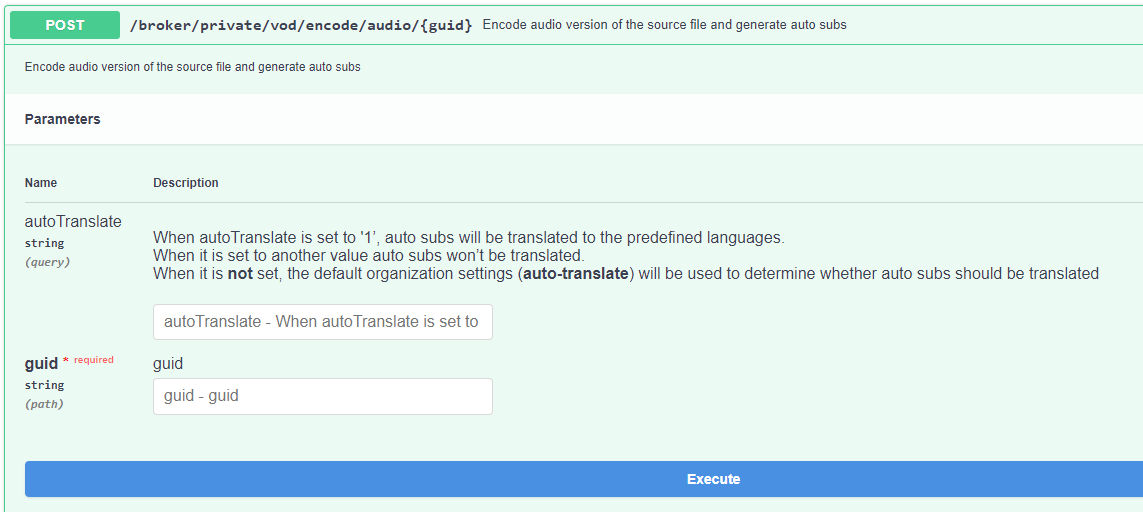
The endpoint accepts two values a guid passed on in the route of the URL and a query string with possible values of 1 and 0.
autoTranslate:
When autoTranslate is set to '1’, auto subs will be translated to the predefined languages. When it is set to another value auto subs won’t be translated. When it is not set, the default organization settings (auto-translate) will be used to determine whether auto subs should be translated
- Leave the autoTranslate to 0 for now, set the GUID of the desired video and execute the request. The successful response should have a response code 200 and the following json:
{
  "status": true,
  "data": "Success."
}
- The video has been submitted to the internal system for processing. Depending on the length of the video and the speech intensity, it will takeanywhere between 5 minutes and double the length of the video.
- When processing has finished a notification will be sent out through the web hook with a body similar to this:
{
  "guid": "abf5d694-fbe0-4ab4-82bb-cc94e2b67cba",
  "file": "Subtitle file for 60fps_solo_a_star_wars_story_trailer_60fps_hfr_hd_32xWl9TRVA8_1080p",
  "status": "success",
  "source_guid": "8cf772ea-45ad-4ba5-9fc9-fe765d884b74",
  "captions": true,
  "subject": "Caption file converted successfully"
}
# Translate Subtitles to a supported language
The IOIO VOD Service allows translation of subtitles to a supported language. This will be demonstrated in the next few steps:
- Make sure that the desired video already has subtitles in English.
- Get the VOD's captionsGuid which is located in the details of the VOD under meta.captionsGuid:
{
  "status": true,
  "data": {
    "guid": "8cf772ea-45ad-4ba5-9fc9-fe765d884b74",
    "mediaType": "source",
    "meta": {
      "originalFileName": "60fps_solo_a_star_wars_story_trailer_60fps_hfr_hd_32xWl9TRVA8_1080p.mp4",
      "imageUrl": "https://qa2.stg.ioio.tv/sources/8cf772ea-45ad-4ba5-9fc9-fe765d884b74/thumbnails/181e9caa81192f1926c04effd487bbac_abr_tumb.0000013.jpg",
      "genre": "Cartoons",
      "title": "60fps_solo_a_star_wars_story_trailer_60fps_hfr_hd_32xWl9TRVA8_1080p",
      "type": "source",
      "group": "For testing",
      "captionsGuid": "abf5d694-fbe0-4ab4-82bb-cc94e2b67cba"
    },
    "srcDuration": 88074,
    "frameCapture": true,
    "srcVideo": "181e9caa8..."
- Now get the details of the captions for that particular VOD from GET /broker/private/vod/captions/{guid} Response from the endpoint should look like this:
{
  "status": true,
  "data": {
    "guid": "abf5d694-fbe0-4ab4-82bb-cc94e2b67cba",
    "files": [
      {
        "guid": "74ba2af2-14d1-42e7-8aae-461e6ef5a5bf",
        "createdAt": 1654610223588,
        "meta": {
          "description": "Auto generated file",
          "screenName": "Subtitle file for 60fps_solo_a_star_wars_story_trailer_60fps_hfr_hd_32xWl9TRVA8_1080p",
          "lang": "ENG",
          "sourceguid": "8cf772ea-45ad-4ba5-9fc9-fe765d884b74"
        },
        "scc": "56cc26f8-782d-4afd-8f1b-552deb11a568.scc",
        "srt": "56cc26f8-782d-4afd-8f1b-552deb11a568.srt",
        "vtt": "56cc26f8-782d-4afd-8f1b-552deb11a568.vtt"
      }
    ],
    "cdnPath": "https://qa2.stg.ioio.tv/sources/captions/abf5d694-fbe0-4ab4-82bb-cc94e2b67cba/"
  }
}
Note:
The files array could contain more than one entries which neccesistates the usage of a file guid in each entry of the array.
- Now get the GUID of the desired file which you would like to translate from the files array.
- Using the following endpoint you can submit a translation job for that particular subtitles file from the VOD: POST /broker/private/vod/captions/{guid}/translation/{fileGuid}
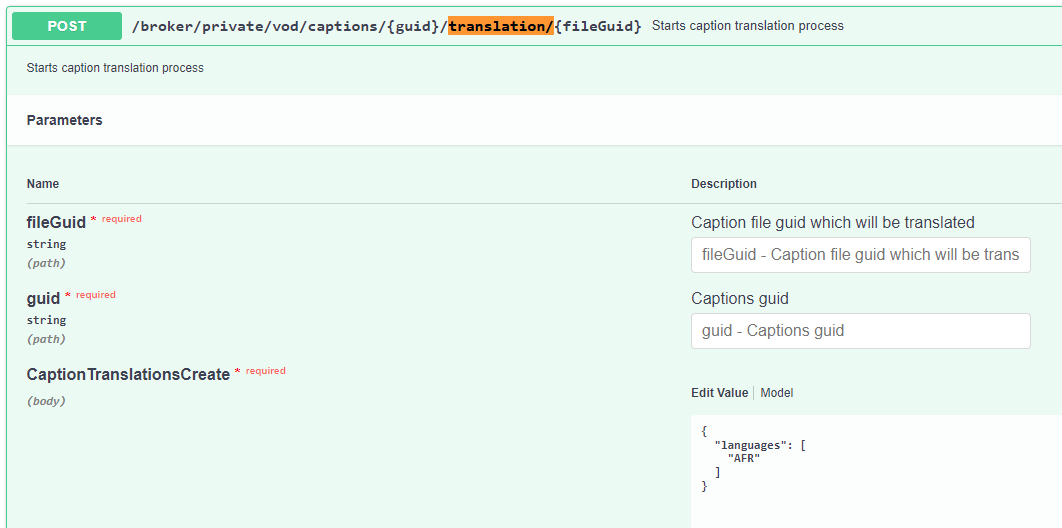
In here for fileGuid use the guid from Step 3 which is located in data > files > 0 > guid to get the guid of the first file from the array. For captions Guid use the guid from the previous step used to get the details of the captions for a particular VOD.
The endpoint body accepts an array of languages. Below is a list of the currently supported entries:
Supported Languages for translation:
AFR, SQI, AMH, ARA, AZE, BEN, BOS, BUL, ZHO, HRV, CES, DAN, FAS, NLD, ENG, EST, FIN, FRA, KAT, GER, ELL, HAU, HEB, HIN, HUN, IND, ITA, JPN, KOR, LAV, MSA, NOR, PUS, POL, POR, RON, RUS, SRB, SLK, SLV, SOM, SPA, SWA, SWE, TGL, TAM, THA, TUR, UKR, URD, VIE
When executed successfully the response will be:
{
  "status": true,
  "data": "Success."
}
# Create a set of predefined languages to translate automatically
If all of the videos which are uploaded to the IOIO VOD Service are to receive an automatically generated subtitles and then translated to a set of particular languages there is an option. The process will be explained in the following steps:
- The endpoint which is used is: PUT /broker/private/settings
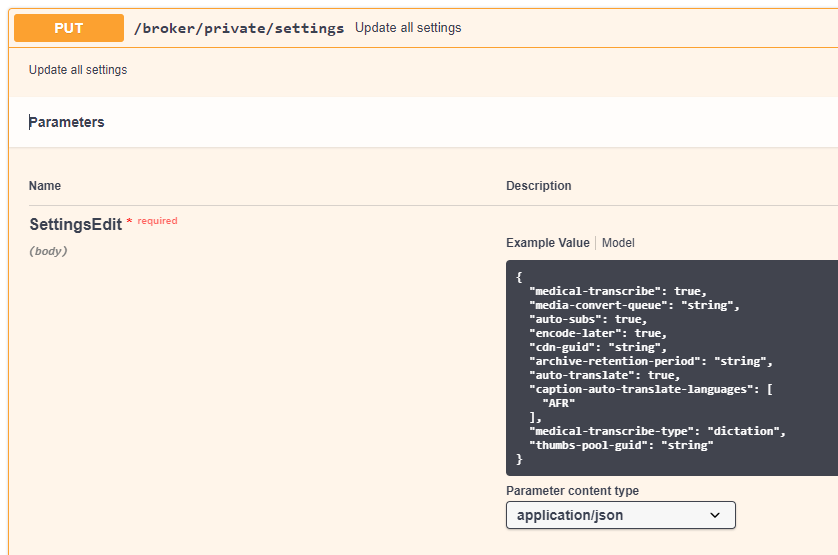
The request body looks like this:
{
  "medical-transcribe": true,
  "media-convert-queue": "string",
  "auto-subs": true,
  "encode-later": true,
  "cdn-guid": "string",
  "archive-retention-period": "string",
  "auto-translate": true,
  "caption-auto-translate-languages": [
    "AFR"
  ],
  "medical-transcribe-type": "dictation",
  "thumbs-pool-guid": "string"
}
The settings which are of interest for us are:
- auto-subs: If the setting is set to true each video which is uploaded to the IOIO VOD service will have it automatically processed for subtitles.
- auto-translate: Works with the auto-subs setting. When auto-translate is set to true, the subtitles which will be automatically generated will then be translated to the desired languages.
- caption-auto-translate-languages: Complementary setting for the auto-translate allows to set to which languages the subtitles will be translated.